
Your AI Doesn’t Understand You — It Can’t Even See You: Why AI Is Still Blind and How LookMood Is Opening Its Eyes

We keep calling AI intelligent. But it has never seen a human face. Over the past two years, artificial intelligence has undergone a meteoric rise. We’ve watched it master the Bar Exam, write sophisticated code in seconds, and translate ancient dialects with startling precision. By all accounts, AI is becoming "smarter" than us. But there is a fundamental, glaring flaw in the current AI revolution: Almost every AI you interact with is legally blind. The Text-Only Delusion We are currently living in the era of "Text-Only Intelligence." You type a prompt into a box, and a machine generates a response based on the statistical probability of the next word. It is a world of pure syntax, devoid of the very things that make human communication meaningful. In the real world, humans don't just "exchange data." We communicate through a complex, silent language of: Micro-reactions that betray our true feelings. Tonal shifts that turn a statement into a questio...

How to unlike Facebook pages

Maybe your one of those people who accidental clicked on "Become a Fan" on a page you did not really want to be a fan of, or you simply have become a fan of too many pages and now you want to clear up your favorite pages section whatever it may be it is an easy process. You you stop becoming a fan of a page it will no longer appear in your favorite pages section. If you would like to clear up all your pages and have none appear on your favorite pages section you would need to un-fan yourself from all the pages you are a fan of. Using the word un-fan with your permission.

Become a Fan has now been changed to Like. Now when you click on Like on a Facebook page you automatically become a fan. The way to not be a fan anymore is to click the 'Unlike'button on a page. Once you click on Unlike, the page is removed from your profile and you will not longer receive status updates from that page.
 How to unlike facebook pages

How to Unlike Facebook pages

1. Login to Facebook

2. Go to the page you want to Unlike

3. Click on liked

4. At the bottom is the option to Unlike

5. Click on it and you're done.

Please find below the older method.

How to remove myself from a Facebook page
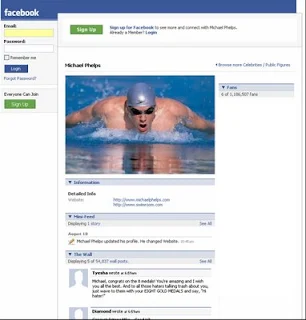


1. Login to your Facebook account.
2. Click on "Profile"
3. Click on "Info"
4. Under pages click on the page you would like to delete or remove.
5. You will be taken to the actual page.
6. Scroll all the way down to the bottom of the page, just below fans you will find "Remove Me from Fans"
7. Click on Remove me from fans
8. You're done

This page will no longer appear in your favorite page list and you will no longer be a fan of this page.


Comments

Popular posts from this blog

How to delete past posts on Facebook

With the new Facebook Timeline comes added features such as your friends ability to see all your past activity, the stuff you might have hidden for so long. Another problem with the new Facebook Timeline is that if you have previous chosen to hide all 'Like' activities. That has been removed and all you 'Like' activity on Facebook shows up on your Timeline. This is a boon for websites like ours. Since the more likes we get the more popular we are going to become. Anyways back to the topic. Now if you have something you can see on your Timeline that you do not want to be  seeing there. You can get rid of it immediately and not have to worry about it again.  How to hide or remove any post from your timeline - maybe an embarrassing photo, video or status update 1. Login to Facebook 2. Click on your name which should bring-up your Facebook Timeline.  3. Hover over the right-hand corner of any post, update, image, video and you should ge...

Mood Is the New Metric: Why Emotional Tech Will Define the Next Decade

  We’ve tracked steps, sleep, calories, and clicks. But what if the most meaningful metric has always been our mood? The Future of Metrics Is Emotional Over the past decade, the digital world has become obsessed with measurement. From productivity apps tracking your keystrokes to wearables logging your heart rate and REM cycles, we’ve built a culture around optimization. But despite all the data, one question remains elusive: How are you actually feeling? This is where a quiet but powerful revolution is taking place — the rise of emotional technology . Mood is no longer a mystery. It’s becoming a measurable, actionable signal in both personal and professional life. What Is Emotional Tech? Emotional tech — sometimes called affective computing — refers to software and hardware designed to recognize, interpret, and respond to human emotions. This includes: AI mood detection tools that analyze facial expressions, tone of voice, and micro-gestures Mood tracking apps t...

How to Delete notifications on Facebook

There are three methods to hide, stop or delete notifications on Facebook . You know how annoying it is when notifications keep coming. So here goes. There are many reasons' why Facebook notifications can be quite a pain. This is especially true if you're a gamer and you keep getting game notifications. Also notifications from apps can be quite constant and also make a sound. If you want to turn-off notification sounds - please follow our post here . A 1. On your News Feed choose the notification you want to hide and point the mouse to the right corner. 2. The word 'Hide' appears. Click on it 3. You are asked if you would like to hide your friend or hide to App. 4. Click on hide the App. (Would mostly be Farmville or petville) B 1. On the top right hand corner click on 'Account' 2. Click on 'Account Settings' 3. Click on 'Notifications' 3. On the right you will see a long list of Applications that sends you notifications to turn off the notificat...