
The Trump-Xi Beijing Summit: What the Smiling Handshakes Won't Tell You

On Thursday, Donald Trump will walk into the Great Hall of the People in Beijing, shake Xi Jinping's hand, and declare it a great meeting. There will be announcements. There will be numbers — billions of dollars in Chinese purchase commitments, a new bilateral mechanism with an important-sounding name, possibly a joint statement on Iran. Trump will post on Truth Social. Markets will rally briefly. Pundits will argue about who won. None of that will tell you what actually happened. What is actually happening in Beijing this week is something more consequential and more uncomfortable than the summit theatre will reveal: two leaders of two deeply mutually dependent superpowers, both of whom need this meeting to succeed for entirely different reasons, sitting across a table in a world that has already moved past the assumptions that defined their last nine months of negotiations. The Iran war changed the equations. The rare earth gambit changed the power balance. Taiwan is sitting in...

Facebook Cover Photo Privacy Settings


This post has more to do with what actually happens once you upload a cover photo. Because if you're wondering if the Facebook cover photo has any options for privacy, there are none. You Cover photo is public and that's why when you visit your albums on Facebook you 'Cover Photos' album does not have cog and a drop-down arrow to change privacy settings. The Album only has a globe icon and if you hover over the globe icon you will see a pop-up with the message 'Cover Photos are public'. Facebook Cover Photo Privacy Settings are nil.

This means if you are really concerned about your privacy and you choose a personal photo as a cover pic, be sure that it is visible to everyone. Your Facebook Timeline is like a resume with everything you decide to share with the public visible to everyone. So if there is a pic that you would rather not upload and make visible to the public. Cover Photo is not a place for it, once upload as a cover photo it is visible. Timeline is your new Facebook Profile and when people search for you and if you have Timeline enabled then this is what they see and you cannot make your Cover Photo only visible to a select few friends. 
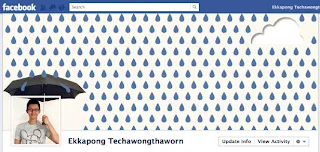
Facebook Cover Photo Privacy Settings

Over the next few weeks Timeline will be rolled out to all users and whether you are ready or not, it is coming to you. This is the new Facebook profile that will be visible to all. So if there is a pic you do not want visible to the public, be sure not to upload it as a cover photo.


Comments

Popular posts from this blog

How to delete past posts on Facebook

With the new Facebook Timeline comes added features such as your friends ability to see all your past activity, the stuff you might have hidden for so long. Another problem with the new Facebook Timeline is that if you have previous chosen to hide all 'Like' activities. That has been removed and all you 'Like' activity on Facebook shows up on your Timeline. This is a boon for websites like ours. Since the more likes we get the more popular we are going to become. Anyways back to the topic. Now if you have something you can see on your Timeline that you do not want to be  seeing there. You can get rid of it immediately and not have to worry about it again.  How to hide or remove any post from your timeline - maybe an embarrassing photo, video or status update 1. Login to Facebook 2. Click on your name which should bring-up your Facebook Timeline.  3. Hover over the right-hand corner of any post, update, image, video and you should ge...

How to Delete notifications on Facebook

There are three methods to hide, stop or delete notifications on Facebook . You know how annoying it is when notifications keep coming. So here goes. There are many reasons' why Facebook notifications can be quite a pain. This is especially true if you're a gamer and you keep getting game notifications. Also notifications from apps can be quite constant and also make a sound. If you want to turn-off notification sounds - please follow our post here . A 1. On your News Feed choose the notification you want to hide and point the mouse to the right corner. 2. The word 'Hide' appears. Click on it 3. You are asked if you would like to hide your friend or hide to App. 4. Click on hide the App. (Would mostly be Farmville or petville) B 1. On the top right hand corner click on 'Account' 2. Click on 'Account Settings' 3. Click on 'Notifications' 3. On the right you will see a long list of Applications that sends you notifications to turn off the notificat...

Mood Is the New Metric: Why Emotional Tech Will Define the Next Decade

  We’ve tracked steps, sleep, calories, and clicks. But what if the most meaningful metric has always been our mood? The Future of Metrics Is Emotional Over the past decade, the digital world has become obsessed with measurement. From productivity apps tracking your keystrokes to wearables logging your heart rate and REM cycles, we’ve built a culture around optimization. But despite all the data, one question remains elusive: How are you actually feeling? This is where a quiet but powerful revolution is taking place — the rise of emotional technology . Mood is no longer a mystery. It’s becoming a measurable, actionable signal in both personal and professional life. What Is Emotional Tech? Emotional tech — sometimes called affective computing — refers to software and hardware designed to recognize, interpret, and respond to human emotions. This includes: AI mood detection tools that analyze facial expressions, tone of voice, and micro-gestures Mood tracking apps t...