There is a quick and instant way to disable public search on Facebook. If you're wondering what Facebook public search is, well, it is your appearance on search engines when people search for you on popular search engines. Like Google, Bing, Yahoo, duckduckgo etc. when public search is enabled on Facebook, you brief profile will appear on search engines when people enter your name. There are many reasons why people don't want to be found on public searches; maybe a Facebook profile was created only for close family and friends or just to stay in touch with a select group. If you think that is you well you might want to head over to Facebook and turn-off public search. Once this is done it will take some time but your information will disappear from all search engines. It takes sometime because all their servers need to get updated.
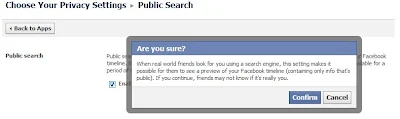
How to turn-off, stop or disable public search on Facebook
1. Login to Facebook
2. Click on the cog icon and then choose privacy settings
3. Click on Privacy
4. Under who can look me up. Click on 'Do you wnat other search engines to link to your Timeline'
5. Remove the tick mark besdie 'Let other search engines link to your Timeline.
6. Click 'OK' and your done
Facebook will warn you that if you turn this off then people searching for you will not be able to see your public timeline and therefore will not be sure if this is really you. If this is what you choose you can turn this off.
Please check video below if you want the visuals
http://youtu.be/foH2i4HN5WQ
Comments
Post a Comment