Artificial intelligence tools are evolving rapidly, but every once in a while a new model arrives that gets people genuinely excited. Claude Fable 5 is one of those models. From writers and programmers to students, researchers, entrepreneurs, and everyday users, many people are discovering that Claude Fable 5 can do far more than answer simple questions. It can help you think, create, analyze, organize, and solve problems in ways that save hours of work. But what exactly should you use Claude Fable 5 for? In this guide, we'll explore the best uses for Claude Fable 5, explain why it stands out, and show practical examples you can start using immediately. What Is Claude Fable 5? Claude Fable 5 is Anthropic's advanced AI assistant designed to handle complex reasoning, writing, coding, research, analysis, and creative tasks. Unlike earlier AI systems that focused mainly on generating text, Claude Fable 5 is built to work with larger amounts of information, maintain context...
If you are one of those people who use Facebook chat a lot but would like to appear to only some friends and not appear online to others. This is a quick guide to help you accomplish just that. This is one privacy feature that you ought not to miss - there could me many reasons. There is this one person who keeps getting in your hair and every time you login to chat with your Facebook friends, this one person keeps messaging you and becoming a nuisance. Using this feature on Facebook chat can help you chat only with the friends you want to while avoiding others. This way you can continue using your Facebook chat without appearing rude to other friends who you would rather not be chatting with right now.
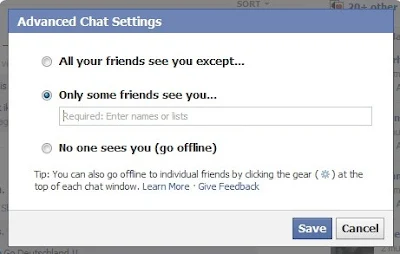
How to remove people from Facebook Chat and limit availability and appear to only a few people.
1. Login to Facebook
2. Click on the cog icon  on the bottom of your sidebar chat window and then select Advanced Settings.
on the bottom of your sidebar chat window and then select Advanced Settings.3. A pop-up appear with three options - a) All your friends see you except b) Only some friends see you c) No one sees you Go Offline.
4. Clicking on the first two options will allow you to enter the names of people who can see you and the ones who won't be able to do so.
5. Click on Save and you're done.
You can now login to Facebook and chat with only the friends you want to while appearing offline to the ones you don't want to chat with.
Comments
Post a Comment