Artificial intelligence tools are evolving rapidly, but every once in a while a new model arrives that gets people genuinely excited. Claude Fable 5 is one of those models. From writers and programmers to students, researchers, entrepreneurs, and everyday users, many people are discovering that Claude Fable 5 can do far more than answer simple questions. It can help you think, create, analyze, organize, and solve problems in ways that save hours of work. But what exactly should you use Claude Fable 5 for? In this guide, we'll explore the best uses for Claude Fable 5, explain why it stands out, and show practical examples you can start using immediately. What Is Claude Fable 5? Claude Fable 5 is Anthropic's advanced AI assistant designed to handle complex reasoning, writing, coding, research, analysis, and creative tasks. Unlike earlier AI systems that focused mainly on generating text, Claude Fable 5 is built to work with larger amounts of information, maintain context...
How to turn on, enable or activate siri on the iPhone 4S. When you first start-up the new iPhone 4S you will notice that it starts up with the old voice recognition pops up when you press down the home button. This is because Siri is turned off by default. So, to turn on the new service which has made the iPhone 4S so famous you will need to do the following. Settings>>General>>Siri
Once Siri has been enabled you have further options like 'Raise to speak', which works well if you are not on a call and simple raising your iPhone to you ears will activate Siri. If you ask Siri for directions which is currently available only in the US, you will be asked to turn on 'Location Service' first. Location service is found under Settings>>Locations Service>>Siri. You can also use your headset by plugging it in and hold the down button to activate Siri.
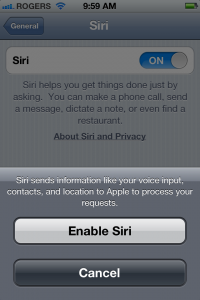
So to use the service it would need to be turned on, as Siri is not activated by default.
Comments
Post a Comment