Artificial intelligence tools are evolving rapidly, but every once in a while a new model arrives that gets people genuinely excited. Claude Fable 5 is one of those models. From writers and programmers to students, researchers, entrepreneurs, and everyday users, many people are discovering that Claude Fable 5 can do far more than answer simple questions. It can help you think, create, analyze, organize, and solve problems in ways that save hours of work. But what exactly should you use Claude Fable 5 for? In this guide, we'll explore the best uses for Claude Fable 5, explain why it stands out, and show practical examples you can start using immediately. What Is Claude Fable 5? Claude Fable 5 is Anthropic's advanced AI assistant designed to handle complex reasoning, writing, coding, research, analysis, and creative tasks. Unlike earlier AI systems that focused mainly on generating text, Claude Fable 5 is built to work with larger amounts of information, maintain context...
There are a number of ways for you to find people on Twitter. The most common being Twitter People Search.Once you login you can use this feature. You can also use Twitter Search, or you could use Twitter Address Book import.
If you know the user name of the person you want to find you can navigate directly to the person profile using the URL. It would look something like this http://twitter.com/username. So if you want to find us on Twitter all you would need to do would be to use our username which is "Sociolatte" in the URL. http://twitter.com/sociolatte.
1. Twitter People Search. To use people search on Twitter you would need to click on the 'Find People' link on the top navigation bar. If you do not find what you looking for you can use the options on the side bar to dig deeper.
2. Twitter Search. Twitter search is a little different from Twitter People Search. Using Twitter search let's you find people mostly by interest. So you can use this feature to find people by keywords locations, interests and more. So if your looking for what people are saying about the latest movie in town or current celebrity gossip then this is the place to search for it. You can also use location based search to find people tweeting near your geographical location. 'locationn:cityname'.
The results that come up can be translated into English and you can even tweet these results. To dig deeper simply use http://search.twitter.com/advanced.
3. Find friends and colleagues from other networks on Twitter. Twitter can check you address books to see if any of your contacts are currently on Twitter. You can access your Gmail, Yahoo and AOL to see if any of your contacts are on Twitter. Once you find who your looking for you can choose to follow them or simply follow one of them.
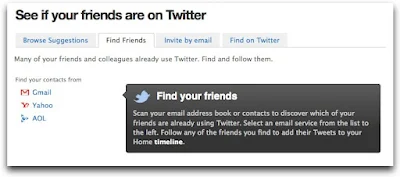
To import an address book simply click on the 'Find People' link on the top navigation bar. Click on the 'Find Friends' tab as shown below. So if you have a Gmail, Yahoo or AOL address. You address would already be pre-filled and the right tab selected. If it is not but you want to search one of these email addresses that belong to you. Simply fill in the required details. Fill in your email ID and password to begin the address book import.
Once your search is complete you can choose to follow all your contacts using the 'Follow All' button or follow individually by clicking the grey 'Follow' button that appears beside your contacts name and info.
If you click 'Follow All' and then decide you would like to stop following some people you would need to do that manually later. By 'unfollow' button beside that contacts name and info.

If you know the user name of the person you want to find you can navigate directly to the person profile using the URL. It would look something like this http://twitter.com/username. So if you want to find us on Twitter all you would need to do would be to use our username which is "Sociolatte" in the URL. http://twitter.com/sociolatte.
1. Twitter People Search. To use people search on Twitter you would need to click on the 'Find People' link on the top navigation bar. If you do not find what you looking for you can use the options on the side bar to dig deeper.
2. Twitter Search. Twitter search is a little different from Twitter People Search. Using Twitter search let's you find people mostly by interest. So you can use this feature to find people by keywords locations, interests and more. So if your looking for what people are saying about the latest movie in town or current celebrity gossip then this is the place to search for it. You can also use location based search to find people tweeting near your geographical location. 'locationn:cityname'.
The results that come up can be translated into English and you can even tweet these results. To dig deeper simply use http://search.twitter.com/advanced.
3. Find friends and colleagues from other networks on Twitter. Twitter can check you address books to see if any of your contacts are currently on Twitter. You can access your Gmail, Yahoo and AOL to see if any of your contacts are on Twitter. Once you find who your looking for you can choose to follow them or simply follow one of them.

To import an address book simply click on the 'Find People' link on the top navigation bar. Click on the 'Find Friends' tab as shown below. So if you have a Gmail, Yahoo or AOL address. You address would already be pre-filled and the right tab selected. If it is not but you want to search one of these email addresses that belong to you. Simply fill in the required details. Fill in your email ID and password to begin the address book import.
Once your search is complete you can choose to follow all your contacts using the 'Follow All' button or follow individually by clicking the grey 'Follow' button that appears beside your contacts name and info.
If you click 'Follow All' and then decide you would like to stop following some people you would need to do that manually later. By 'unfollow' button beside that contacts name and info.

Comments
Post a Comment