Artificial intelligence tools are evolving rapidly, but every once in a while a new model arrives that gets people genuinely excited. Claude Fable 5 is one of those models. From writers and programmers to students, researchers, entrepreneurs, and everyday users, many people are discovering that Claude Fable 5 can do far more than answer simple questions. It can help you think, create, analyze, organize, and solve problems in ways that save hours of work. But what exactly should you use Claude Fable 5 for? In this guide, we'll explore the best uses for Claude Fable 5, explain why it stands out, and show practical examples you can start using immediately. What Is Claude Fable 5? Claude Fable 5 is Anthropic's advanced AI assistant designed to handle complex reasoning, writing, coding, research, analysis, and creative tasks. Unlike earlier AI systems that focused mainly on generating text, Claude Fable 5 is built to work with larger amounts of information, maintain context...
Wondering how to get energy in FrontierVille. Well Zynga the makes of FrontierVille have just shown us a new way of getting instant energy. The all so precious and elusive commodity on FrontierVille. Everyone seems to just be on a quest for energy and never seem to have enough. Well if you have been playing the game for some time you must have amassed a hugh collection of stuff.
How to get more energy by trading in your collections.
1. Login to FrontierVille
2. Click on "My Stuff". You know that icon at the bottom of the game that has a backpack.
3. Click on Collections
4. Click on Trade In
5. You collections that have real value are traded in and you get instant energy.
How do you get stuff in your collections. You know all those challenges and quests that you have been doing. All of those items that you gather get stored in "Collections'. So by clicking in collections you get to see all the items you have collected and these items can be traded in or turned in to get more energy.
Note: Turn these in at the risk of redoing some of your collections to get bonuses. So if you want energy trade them in but you might have to redo some of your challenges.

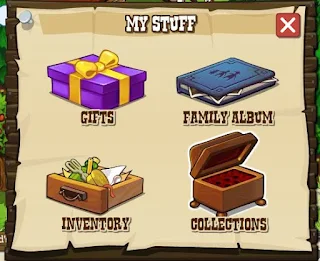
How to get more energy by trading in your collections.
1. Login to FrontierVille
2. Click on "My Stuff". You know that icon at the bottom of the game that has a backpack.
3. Click on Collections
4. Click on Trade In
5. You collections that have real value are traded in and you get instant energy.
How do you get stuff in your collections. You know all those challenges and quests that you have been doing. All of those items that you gather get stored in "Collections'. So by clicking in collections you get to see all the items you have collected and these items can be traded in or turned in to get more energy.
Note: Turn these in at the risk of redoing some of your collections to get bonuses. So if you want energy trade them in but you might have to redo some of your challenges.


Comments
Post a Comment